8 Best Mobile Procurement Software of 2026
By the KeenVerdict research desk · Updated November 28, 2026 · Next review January 12, 2027 · 8 products scored
 Our pickProcurifyTeams that approve and receive away from the office8.7
Our verdict
The real split between these apps is receiving. Procurify, ProcureDesk and Coupa document all three phone tasks: raise a request, approve it, and mark goods received with a photo as proof. ProcureDesk goes furthest for the loading dock, with OCR on packing slips, barcode scanning and offline drafts. Precoro, Zoho Procurement and ProcurementExpress focus their apps on requests, approvals and order tracking, and Precoro says plainly that not all web features are in the app yet. Tradogram includes iOS and Android apps on every plan, but receiving and requisitions are add-ons on its $99 Essentials plan. Ramp's app handles purchase approvals and receipts for companies already on Ramp, with Procurement as an add-on to Plus or Enterprise. If most of your approvers only need to tap approve, the cheaper tools are enough; if people receive goods away from the office, start with Procurify or ProcureDesk.
The short answer
Procurify has the best mobile procurement app for approvals in 2026 because its iOS and Android app lets staff request, approve and mark items received from a phone, with photos of packing slips, and every Procurify plan includes unlimited Basic users who can request and receive. ProcureDesk suits field and warehouse teams that need barcode scanning and offline drafts, from $830 per month billed annually with 10 users. The cheapest options as of November 2026 are Zoho Procurement at $35 per user per month billed annually (iPhone app only) and Tradogram Essentials at $99 per month with iOS and Android apps included.
This list is for finance and operations teams whose buyers, approvers and receivers are not at a desk: site managers, store leads, lab staff, travelling executives. The question is simple: can someone raise a purchase request, approve it and confirm delivery from a phone, and what does that cost? On November 28, 2026 we read each vendor's mobile app page or app store listing and its pricing page, and recorded what the app documents for requests, approvals and receiving, plus plan names and USD prices. We compared documented features and published prices and did not run hands-on tests. Scores weigh features at 40 percent, ease of use at 30 and value at 30. For this list, features means what the vendor says the mobile app itself can do, not only the web product. Six of the eight vendors publish a USD price; Procurify and Coupa quote on request, so their price rows are marked pending.
At a glance
| Rank | Product | Best for | Price | Score |
|---|---|---|---|---|
| 1 | Procurify | Teams that approve and receive away from the office | Price not listed | 8.7 |
| 2 | ProcureDesk | Warehouse, dock and construction teams | $830 per month, 10 users included | 8.5 |
| 3 | Precoro | Approvers who need quick sign-off on a flat plan | $499 per month | 8.4 |
| 4 | Zoho Procurement | Small teams on iPhones with a tight budget | $35 per user per month | 8.4 |
| 5 | Tradogram | Small teams that want a flat entry price | $99 per month plus user fees | 8.1 |
| 6 | ProcurementExpress | Nonprofits and human services organizations | $415 per month | 8.0 |
| 7 | Ramp Procurement | Companies already using Ramp cards | $15 per user per month plus platform fee, before the Procurement add-on; free plan | 8.0 |
| 8 | Coupa | Large enterprises with many approvers | Price not listed | 7.9 |
By the numbers
- $167 billionGlobal consumer spending on in-app purchases and paid apps reached $167 billion in 2025, up 10.6% from 2024, according to Sensor Tower.Source: Sensor Tower
- 150 billionApp downloads across the App Store and Google Play reached nearly 150 billion worldwide in 2025, up 0.8% from 2024, according to Sensor Tower.Source: Sensor Tower
- 5.3 trillion hoursPeople spent 5.3 trillion hours in iOS and Google Play apps in 2025, about 3.6 hours a day per mobile user, Sensor Tower estimates.Source: Sensor Tower
- 3.8 billionGenerative AI apps were downloaded 3.8 billion times in 2025, double the prior year, and earned more than $5 billion in in-app purchases.Source: Sensor Tower
- $1,468 billionGartner forecast worldwide software spending of $1,468 billion in 2026, up 15.5% from $1,271 billion in 2025, in its July 2026 forecast table.Source: Gartner
How we scored
Every product gets the same three scores out of 10. We compared documented features and published prices; we did not run hands-on tests.
- 40%Features
- 30%Ease of use
- 30%Value
No. 1, our pick
ProcurifyProcure-to-pay platform with an iOS and Android app for requests, approvals, purchase orders, receiving, spending cards and expenses.
8.7of 10Best for Teams that approve and receive away from the office
- Features
- 9.3
- Ease of use
- 9.0
- Value
- 7.6
Price
See vendor pricing (USD check pending); custom quote built around products, add-ons, users and integrations
US price check pending. See the Procurify pricing page.
Procurify is the most complete fit for the question this list asks. Its mobile page describes an iOS and Android app where employees submit purchase and expense requests, browse catalogs and even start a request from an uploaded vendor quote. Approvers get push notifications, approve purchase and expense requests by budget, see who is next in line and leave comments that tag colleagues. Receiving is documented in detail: mark items received, notify the requester and purchaser, photograph the shipping receipt and packing slip, and upload photos of damaged goods. The app also handles virtual Spending Cards and expense reports. Procurify's pricing page says the mobile app is part of Purchasing, the base package, and that customers get unlimited Basic users who can request and receive, which keeps a phone rollout to field staff from multiplying seat costs. The trade-off is price transparency: every quote is custom, and AP and card products cost extra.
What works
- +Covers request, approve and receive in one app, per Procurify's mobile page
- +Unlimited Basic users can request and receive items; pricing is set by Pro users
- +The mobile app is included with Purchasing, the base every customer starts with
What does not
- −No published price; every quote is custom
- −AP, Expense and Card, Guided Intake and Contracts are extra products or add-ons
- −No free trial is listed on the pricing page
- Mobile platforms
- iOS and Android
- Mobile receiving
- Yes, with photos of packing slips and damaged goods
- Seat rule
- Unlimited Basic users; pricing by Pro users
No. 2
 ProcureDesk
Procurement and AP software with native iOS and Android apps built for warehouse and job-site receiving.
8.5of 10Best for Warehouse, dock and construction teams
- Features
- 9.2
- Ease of use
- 8.8
- Value
- 7.4
Price
Startup $830 per month billed annually ($9,960 per year) with 10 users; $20 per month per extra user; Growth $1,250 per month billed annually; 30-day money-back guarantee
Quoted from the ProcureDesk pricing page on November 28, 2026:
$830 /mo Billed annually - $9,960/yr 10 users included
ProcureDesk pitches its mobile app at the people who receive goods: its capabilities page says the native iOS and Android apps are designed for the warehouse floor and the construction site, not a shrunken web view. Approvers can approve from a lock-screen notification and see line items, budget impact bars and earlier comments before they tap. Receiving happens at the dock: OCR scans packing slips and pulls out line items, photos document condition or damage, and stock levels update when items arrive. Requesters can scan an item's barcode to start a request, and GL codes and department fill in from the user profile. ProcureDesk also says the app drafts requests and shows past orders offline, and that a request started on a phone can be finished at a desk. Startup costs $830 per month billed annually with 10 users, and adds $20 per month per extra user. That is the highest entry price here, so the app pays off when many receipts happen away from the office.
What works
- +The most detailed receiving tools in this list, including OCR on packing slips and photo capture
- +Startup includes 10 users, requests, POs, receiving, invoices and budget tracking
- +30-day money-back guarantee on all plans, per the pricing page
What does not
- −Highest published entry price here: $9,960 per year on Startup
- −Startup is described for companies under 100 employees on QuickBooks or Xero; NetSuite and Intacct sit on Growth
- −Each user beyond 10 adds $20 per month
- Mobile platforms
- Native iOS and Android
- Offline
- Draft requests and view past orders
- Entry plan
- Startup, $830 per month billed annually, 10 users
No. 3
 Precoro
Procure-to-pay software with a native iOS and Android app for purchase requests, approvals, order tracking and sending POs.
8.4of 10Best for Approvers who need quick sign-off on a flat plan
- Features
- 8.6
- Ease of use
- 8.7
- Value
- 7.8
Price
Core from $499 per month billed annually; Automation from $999 per month billed annually; Enterprise custom
Quoted from the Precoro pricing page on November 28, 2026:
Core starts at $ 499 /month billed annually Ideal for small teams with essential procurement needs.
Precoro's app is built around the approver. Its mobile page lists purchase request submission and status tracking, one-click approval or rejection after reviewing the document, order status tracking, and sending approved POs straight to suppliers, plus team collaboration on each request. The pricing page puts the iOS and Android app and mobile notifications on every plan, starting with Core at $499 per month billed annually, which also includes 2- and 3-way match, a catalog, vendor management and QuickBooks Online or Xero integration. Precoro is candid about limits in its own FAQ: the app provides key web features such as approvals, order tracking and PO dispatch, not all web functions are available yet, and it needs an internet connection to approve or send POs. Receiving on the phone is not listed on the mobile page, so teams that confirm deliveries in the field should check that in a demo. For finance teams whose managers mostly need to approve on the move, it is a solid flat-price choice.
What works
- +The mobile app is included on the $499 Core plan, per the pricing page
- +Apps on both the Google Play Store and the Apple App Store
- +Core also covers 2- and 3-way match, vendor management and QuickBooks Online or Xero sync
What does not
- −Precoro says not all web features are available in the app yet
- −The app needs an internet connection to approve or send POs
- −Both published prices are billed annually, so Core is about $5,988 a year
- Mobile platforms
- iOS and Android
- Offline
- No, an internet connection is required
- Entry plan
- Core, from $499 per month billed annually
No. 4
 Zoho Procurement
Source-to-pay software from Zoho with an iPhone app for purchase requisitions, approvals, RFQ tracking, POs and budgets.
8.4of 10Best for Small teams on iPhones with a tight budget
- Features
- 8.0
- Ease of use
- 8.4
- Value
- 8.8
Price
Premium $35 per user per month billed annually; Enterprise $75 per user per month billed annually; 14-day free trial
Quoted from the Zoho Procurement pricing page on November 28, 2026:
Premium $35 per user/month billed annually
Zoho Procurement is the cheapest way on this list to give a handful of people a procurement app. The App Store listing, published by Zoho Corporation, describes a source-to-pay app where requesters create and submit purchase requests, choose catalog items, track status and respond to approval requests, while admins approve requests, track budgets, bill payments and vendor credits, and follow RFQ bidding in real time. The pricing page lists Premium at $35 per user per month and Enterprise at $75 per user per month, both billed annually, with a 14-day trial. Two limits matter for a mobile rollout. The listing is marked Only for iPhone, and we did not find an Android version from Zoho, so mixed-device teams should check first. The listing also does not describe receiving goods from the phone. Because pricing is per user, it stays cheap only while few people need an account.
What works
- +Lowest per-user entry price in this list: $35 per user per month billed annually
- +The app also tracks RFQ bidding and budgets, not just approvals
- +14-day free trial before you pay
What does not
- −The App Store listing is marked Only for iPhone; we found no Android app from Zoho
- −The app listing does not mention goods receipt on the phone
- −Per-user pricing: 10 users on Premium cost $350 per month billed annually
- Mobile platforms
- iPhone (App Store listing says Only for iPhone)
- Entry plan
- Premium, $35 per user per month billed annually
- Free trial
- 14 days
No. 5
 Tradogram
Procurement software with POs, supplier management, AP invoices and iOS and Android apps on every plan.
8.1of 10Best for Small teams that want a flat entry price
- Features
- 7.6
- Ease of use
- 8.0
- Value
- 8.9
Price
Essentials $99 per month billed monthly, or $950.40 per year; additional user fee applies; Premium and Scale custom
Quoted from the Tradogram pricing page on November 28, 2026:
Essentials For teams that need core purchasing, supplier, and invoice workflows $99 /month 1+ users
Tradogram is the budget pick for teams that want a flat monthly price and an app on both stores. The pricing table lists Mobile Apps for iOS and Android as included on Essentials, Premium and Scale, and Essentials costs $99 per month, or $950.40 per year, plus an additional user fee. The homepage says approval rules by amount, department or GL code route each request to the right approvers from desktop or mobile, and employees can submit expense claims from mobile with receipts read by TradoScan AI. The catch for a mobile procurement rollout is the plan split: Requisitions and Receiving (GRN) are add-ons on Essentials and included only from Premium, which is quoted. Tradogram's own App Store listing also says the apps are built on top of the web app to give access to some features on the go, so check which screens your requesters and receivers will use before you commit.
What works
- +Cheapest flat entry price here: $99 per month on Essentials
- +Mobile apps are listed as included on every plan
- +Monthly billing is available; yearly saves 20 percent
What does not
- −Requisitions and Receiving (GRN) are add-ons on Essentials
- −An additional user fee applies on top of the $99 price
- −Tradogram's App Store listing says the apps give access to some features on the go
- Mobile platforms
- iOS and Android, all plans
- Entry plan
- Essentials, $99 per month
- Receiving on Essentials
- Add-on
No. 6
 ProcurementExpress
Purchase order and approval software with iOS and Android apps, priced by monthly spend managed.
8.0of 10Best for Nonprofits and human services organizations
- Features
- 7.8
- Ease of use
- 8.3
- Value
- 7.9
Price
Basic $415 per month (up to $10k spend per month); Better $900 per month; Best $2,550 per month; free trial on each plan
Quoted from the ProcurementExpress pricing page on November 28, 2026:
Basic $415 per month Self Service Set-Up QuickBooks Integration Single Organization
ProcurementExpress is a purchase order and approval tool that now positions itself for human services organizations that need 2 CFR 200 compliance and audit readiness. Its features page lists a full mobile app for iOS and Android to create and approve purchase requests on the go, and the App Store listing adds raising purchase orders, tracking budgets in real time and capturing invoices from the phone. The useful detail for approvers is that the remaining budget sits on the purchase request, so the person tapping approve sees whether it fits. Pricing is by monthly spend managed rather than by user: Basic is $415 per month with self-service setup, QuickBooks and up to $10k in monthly spend, Better is $900 per month with Sage 50 and Amazon punch-outs, and Best is $2,550 per month. Each plan lists a free trial. Receiving from the phone is not described in the listing we read.
What works
- +Budget check sits on the request, so approvers see remaining budget on the phone
- +Self-service setup in about 15 minutes with no credit card, per the pricing page
- +Built for 2 CFR 200 compliance in human services organizations
What does not
- −Basic caps managed spend at $10k per month
- −Amazon punch-outs start on Better at $900 per month
- −The app listing does not describe receiving goods on the phone
- Mobile platforms
- iOS and Android
- Entry plan
- Basic, $415 per month, up to $10k spend per month
- Setup
- Self-service on Basic
Visit procurementexpress.com|Read the full ProcurementExpress review
No. 7
 Ramp Procurement
Procurement add-on to Ramp's corporate card and spend platform, with a mobile app for purchase approvals and receipts.
8.0of 10Best for Companies already using Ramp cards
- Features
- 7.6
- Ease of use
- 8.6
- Value
- 8.0
Price
Plus $15 per user per month plus a platform fee based on team size; Procurement is an add-on to Plus or Enterprise
Quoted from the Ramp Procurement pricing page on November 28, 2026:
AI-powered Plus $15/mo/user + Platform fee based on team size
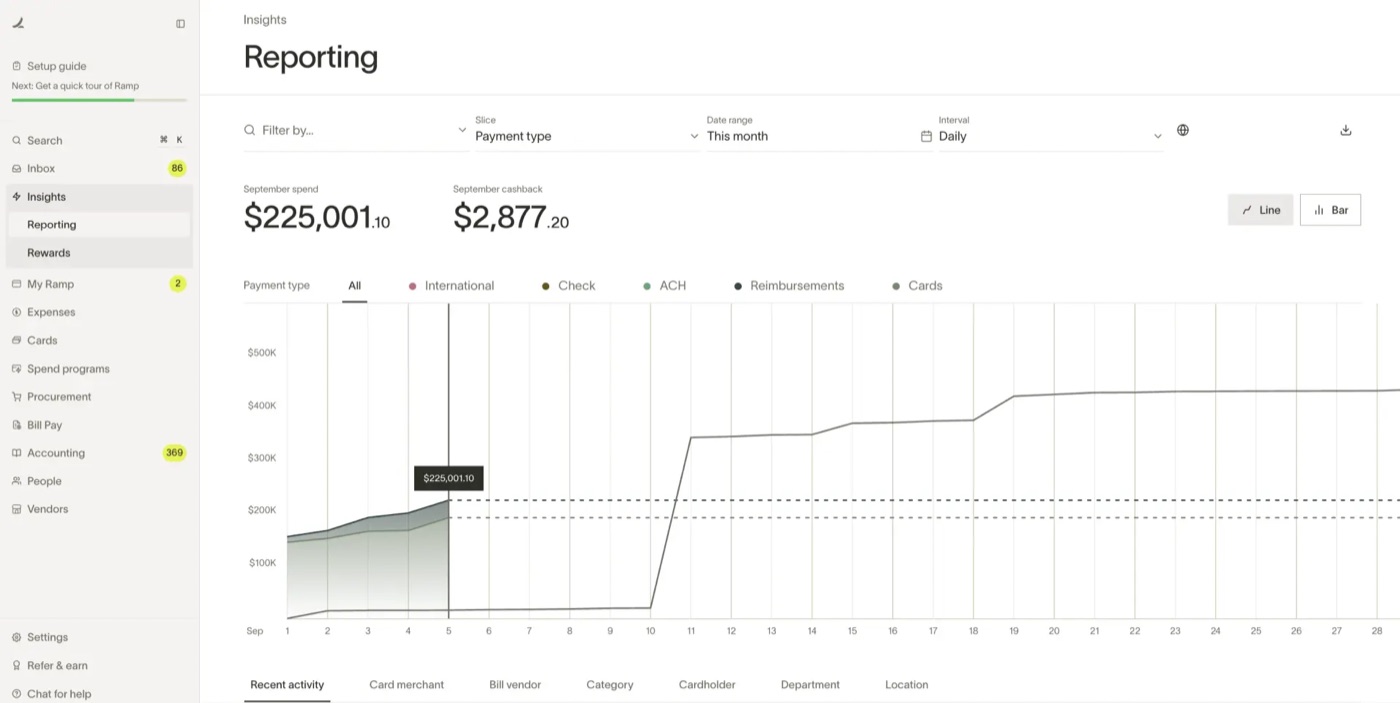
Ramp Procurement makes sense when the company already runs cards and expenses on Ramp. Ramp's mobile app page says managers can approve team purchases and budget requests, review the amount, reason and approval recommendation, approve bills, and lock or replace cards, on apps for the App Store and Play Store. On the web, the procurement product starts from a plain-language request or an uploaded quote, routes approvals in parallel by budget, department or vendor type, creates POs and three-way matches them with card transactions. Pricing is the hard part to compare: Plus is $15 per user per month plus a platform fee based on team size, and the pricing page lists Procurement as an add-on to Plus or Enterprise without a separate figure that we could find. The mobile app page also focuses on approvals, receipts and cards rather than receiving goods, so teams that confirm deliveries on the phone should check that workflow.
What works
- +One app for cards, expenses, bills and purchase approvals
- +Approval rules by budget, department or vendor type, with parallel routing
- +A $0 Free plan exists for expenses and bill pay
What does not
- −Procurement requires Plus or Enterprise; we did not find a separate add-on price on the pricing page
- −The mobile app page does not mention receiving goods against a PO
- −Plus adds a platform fee based on team size on top of $15 per user
- Mobile platforms
- iOS and Android
- Procurement availability
- Add-on to Plus or Enterprise
- Free plan
- Yes, without Procurement
No. 8
 Coupa
Enterprise business spend management platform with a free Coupa Mobile app for approvals, requests, receiving, expenses and virtual cards.
7.9of 10Best for Large enterprises with many approvers
- Features
- 9.0
- Ease of use
- 7.8
- Value
- 6.6
Price
See vendor pricing (USD check pending); quoted by Coupa sales; the mobile app is free for Coupa users
US price check pending. See the Coupa pricing page.
Coupa is the enterprise option, and its Coupa Mobile app covers more than approvals. The App Store listing, published by Coupa Software, says users get push notifications when a request needs attention and can approve, reject or hold documents. They can shop personalized catalogs or write a request for off-catalog items, mark PO lines as received so suppliers can get paid, and use the camera to attach pictures as proof of receipt. The app also handles expense reports with receipt photos and OCR, and shows virtual cards issued for POs or pre-approved expenses. The app is free for Coupa users and uses the same URL and login as the browser. Two caveats: Coupa says app and feature availability depend on company settings, so what employees see is set by the admin, and pricing is by quote only. For a large organization already running Coupa, the app is a strong reason to push approvals and receiving to phones; for a small team it is far more platform than needed.
What works
- +Covers approve, request and receive in one app, per Coupa's App Store listing
- +The mobile app is free for Coupa users with the same URL and login as the web
- +Apps on the Apple App Store and Google Play
What does not
- −No published price; Coupa is sold by quote
- −App and feature availability depend on each company's settings
- −Built for large organizations, more than a small team needs
- Mobile platforms
- iOS and Android
- Mobile receiving
- Yes, PO lines with photo proof
- App cost
- Free for Coupa users
Before you choose
List the three phone tasks you need
Write down who must do what from a phone: create a request, approve it, or confirm delivery. Approvals are covered by every app here. Mobile receiving is not: Procurify, ProcureDesk and Coupa document marking items received with photos, while Precoro's app page lists approvals, order tracking and PO dispatch, and says not all web features are available in the app yet.
Native app on both stores, or one
Check both app stores before you buy. Procurify, Precoro, ProcureDesk, Tradogram, Coupa and Ramp document iOS and Android apps, and ProcurementExpress lists a full app for iOS and Android. Zoho Procurement's App Store listing is marked Only for iPhone, so teams with Android phones should confirm availability with Zoho first.
Count who pays for a seat
Mobile rollouts add many occasional users, so seat rules matter. Procurify says customers have unlimited Basic users who can request and receive, with pricing set by Pro users. ProcureDesk Startup includes 10 users and charges $20 per month for each additional user. Zoho Procurement and Ramp Plus are priced per user, and Tradogram adds a user fee on top of the $99 Essentials price.
Check internet needs on site
Job sites and warehouses often have weak signal. Precoro says its app needs an internet connection to approve or send POs. ProcureDesk says its app lets you draft requests and view past orders in Wi-Fi dead zones. Coupa's App Store listing says feature availability depends on your company settings, so ask your admin what is switched on.
Price the plan that includes receiving
The cheapest entry plan may not include the mobile feature you want. Tradogram Essentials at $99 per month includes the mobile apps, but Receiving (GRN) and Requisitions are add-ons on that plan. ProcureDesk Startup at $830 per month billed annually lists requests, POs, receiving and invoices. Precoro Core at $499 per month billed annually includes the mobile app.
Questions readers ask
- Which procurement software has the best mobile app for approvals?
- Procurify has the best mobile app for procurement approvals in 2026. Its iOS and Android app sends push notifications, lets approvers approve purchase and expense requests by budget, shows who approves next and supports in-app comments, and it also handles receiving with photos.
- Can employees create purchase requests and receive goods from a phone?
- Yes, with Procurify, ProcureDesk and Coupa. All three document creating requests and marking goods received on the phone with photos, and ProcureDesk adds OCR scanning of packing slips; Precoro, Zoho Procurement and ProcurementExpress document requests and approvals but not mobile receiving on the pages we read.
- What do mobile procurement tools cost for a small team?
- Zoho Procurement starts at $35 per user per month billed annually and Tradogram Essentials at $99 per month plus user fees, as of November 2026. Precoro Core starts at $499 per month billed annually with the mobile app included, and ProcureDesk Startup costs $830 per month billed annually with 10 users.
- Which mobile procurement apps work on both iPhone and Android?
- Procurify, Precoro, ProcureDesk, Tradogram, ProcurementExpress, Coupa and Ramp document apps for both iOS and Android. Zoho Procurement's App Store listing is marked Only for iPhone, and we did not find an Android version from Zoho.
- Do mobile procurement apps work offline?
- Partly, and only on some tools. ProcureDesk says its app drafts requests and shows past orders in Wi-Fi dead zones, while Precoro says its app needs an internet connection to approve or send POs.
- Do I pay extra for the mobile app?
- No, on the tools that state it. Precoro includes the mobile app on every plan from Core, Tradogram lists iOS and Android apps on all plans, Procurify includes it in Purchasing, and Coupa says its mobile app is free for Coupa users.
Sources and price checks
- Procurify: procurify.com/pricing, checked November 28, 2026, price not verified
- ProcureDesk: procuredesk.com/pricing, checked November 28, 2026
- Precoro: precoro.com/pricing, checked November 28, 2026
- Zoho Procurement: zoho.com/procurement/pricing, checked November 28, 2026
- Tradogram: tradogram.com/pricing, checked November 28, 2026
- ProcurementExpress: procurementexpress.com/pricing, checked November 28, 2026
- Ramp Procurement: ramp.com/pricing, checked November 28, 2026
- Coupa: coupa.com, checked November 28, 2026, price not verified
Cite this page
KeenVerdict. 8 Best Mobile Procurement Software of 2026. Updated November 28, 2026. https://keenverdict.com/best/best-mobile-procurement-software
Questions or corrections: editorial@keenverdict.com
Read our editorial policy. Prices change often; check the vendor page before you buy.