Guide · General
HR Help Desk Software: What It Does and How to Choose
Compare HR help desk software features, employee support workflows, SLAs and privacy controls, with a step-by-step guide to choosing the right tool in 2026.
By the KeenVerdict research desk · Updated November 6, 2026 · 13 min read
A payroll question is buried in the shared inbox. A manager has chased a leave approval through chat. An employee has sent medical information to an address that several people can open. The HR team doesn't need another place to collect messages. It needs a controlled way to assign work, protect records and confirm what happened.
The short answer is to buy an HR case system, not just a ticket queue. For a small team, correct routing, restricted access and an exportable history matter more than a large automation catalogue. The strongest choice is the simplest product that handles those requirements without needing a dedicated administrator.
Table of Contents
- What HR Help Desk Software Does for Employees
- Choosing Between HR Help Desk Tool Types
- Features to Compare Before You Buy
- How an Employee Request Moves Through the Desk
- Setting Response Targets by Case Severity
- Protecting Sensitive Employee Cases
- Whether AI Self-Service Fits a Small HR Team
- Choose Your HR Help Desk Software Step by Step
What HR Help Desk Software Does for Employees
HR help desk software is a ticketing and case system where employees submit HR questions and requests, HR staff resolve them, and managers track volume and turnaround. It performs three jobs: answering routine questions, completing transactions and escalating sensitive matters.
Think of a hotel concierge. Guests don't need to know which department handles a request. Someone logs it, assigns it and follows up. Employees should receive the same clear handoff without having to understand the organisation's HR structure.
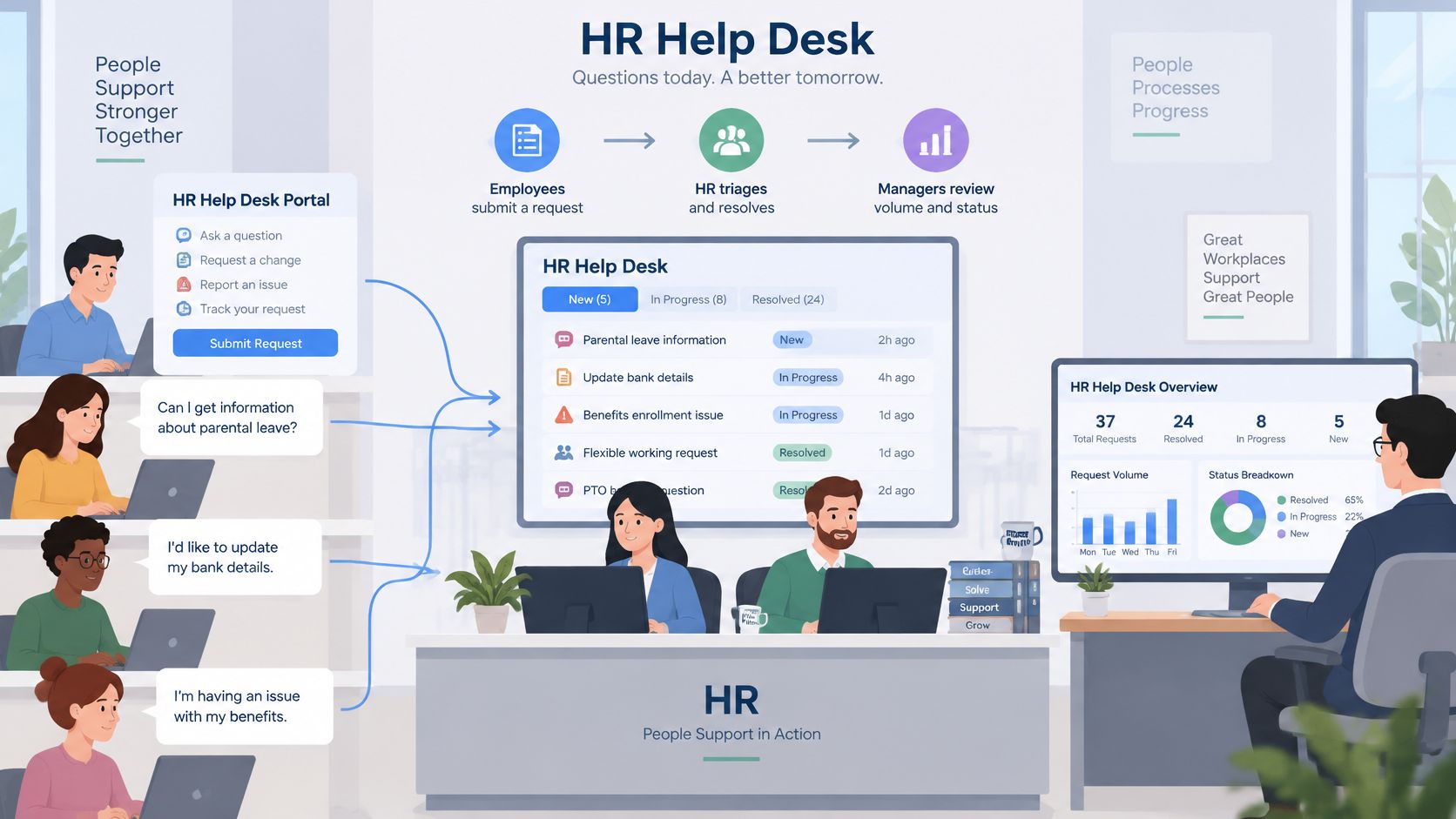
An approved knowledge base handles questions about expenses or holidays. Transaction workflows handle leave, address changes and payslip copies. Named specialists receive grievances, payroll disputes and other cases that need restricted access and human judgment.
Signs the shared inbox has reached its limit
- Repeated questions: The same policy question arrives every week, but nobody owns the underlying article.
- Unknown age: Staff can't establish how long a request has been waiting.
- Mixed sensitivity: Confidential cases sit beside routine document requests.
A desk makes these problems visible instead of leaving staff to reconstruct email threads.
According to Mordor Intelligence's employee help desk market forecast, the market is projected to grow from USD 7.10 billion in 2026 to USD 11.67 billion by 2031, while cloud deployment held 66.14% of market share in 2025. Category growth doesn't prove product fit. The broader HR technology statistics provide context, not a purchasing verdict.
KeenVerdict's help desk ranking serves support leads, founders and operations managers choosing ticketing software or leaving a shared inbox. Its comparison used documented features and published prices, not hands-on tests. The checks below therefore need confirmation in a trial.
Choosing Between HR Help Desk Tool Types
The common routes are a standalone HR case desk, a module within an HR suite, or an IT service management platform configured for HR. Start with the route that creates the least ongoing administration, provided it can protect confidential cases.
| Route | Best fit for a small HR team | Main trade-off |
|---|---|---|
| Standalone HR case desk | Employee support spans payroll, benefits and employee relations | Another supplier and integration to maintain |
| Existing HR suite module | Employee records and payroll already sit with that supplier | Routing and exception handling may be less configurable |
| IT service management platform | IT already maintains a service desk | HR needs separate permissions, categories and ownership |
An existing HR module deserves the first demonstration when it can meet the access requirements. Staff shouldn't add a separate platform merely to obtain a more attractive portal.
A standalone desk becomes more compelling when specialists need distinct case access and service targets. An IT platform, such as Jira Service Management or Freshservice, belongs on the shortlist when someone already owns its administration. Familiarity within IT isn't proof that HR can safely share its configuration.
Procurement rule: A shared platform is useful only when HR records remain properly separated.
Hosted software is the practical starting point for a lean team. Consider on-premise deployment only when a documented data-residency requirement cannot be met through hosted regional options.
These routes are KeenVerdict's editorial classification, not standard vendor categories. Each needs a documentation check: Can the product restrict individual cases, separate sensitive categories and export the complete audit history? Reject any route that cannot demonstrate those capabilities.
Features to Compare Before You Buy
Core HR help desk features and what to check
| Feature | What to check | Why it matters for HR |
|---|---|---|
| Intake channels | Portal form, email and chat, plus a searchable knowledge base | Employees ask from the place they already work |
| Routing rules | Routing by request type, location and sensitivity tag | Keeps payroll and employee relations cases away from general queues |
| Knowledge base | Named article owners, review dates and version history | Stale policy answers generate repeat tickets |
| Workflow automation | Approval steps for leave, address changes and document requests | Repeatable requests need less manual handling |
| Role-based access | Case-level permissions and separate investigation views | Limits access to compensation and medical details |
| Audit logs | Records of reads, edits, exports and reassignments | Lets compliance teams reconstruct case access |
| HR system integration | Sync with the HRIS, payroll and identity provider | Avoids double entry of employee records |
| Reporting | Volume by case type, SLA by priority and first-contact resolution | Identifies request types that miss their targets |
| Pricing unit | Per agent, per request or per employee | Determines how the bill changes with staffing or usage |
Treat this table as an acceptance checklist, not proof that a product supports every item. A feature name on a pricing page doesn't establish which plan includes it, how fully it works or who must configure it.
Put routing and permissions first
An HR desk must distinguish a payroll correction from a policy question before either enters a working queue. A product with attractive dashboards but weak case restrictions fails that test.
Intake also needs scrutiny. Email convenience isn't enough if replies expose attachments to everyone copied on the original thread. The demonstration should show what happens when an employee submits confidential details through the least structured channel.
Knowledge management needs named ownership. An article without a review date or accountable editor can remain searchable after the underlying policy changes. Version history should establish which answer an employee received.
Require complete demonstrations
- Leave request: Follow submission, manager approval, HR confirmation and the resulting HRIS update. Establish whether integration means a real update or merely a notification.
- Sensitive case: Route a complaint to a named specialist, then attempt access using an unrelated agent account.
- Reporting: Filter missed targets by case type and priority rather than accepting a total-volume dashboard.
- Administration: Have an HR administrator change a rule, identify the affected cases and reverse the change.
A feature that requires outside help for every routine change creates an ongoing administration cost.
General help desk rankings often compare customer support and IT service desks. Their conclusions don't establish HR suitability. Case restrictions, employee identity matching and confidential reporting need their own acceptance tests.
How an Employee Request Moves Through the Desk
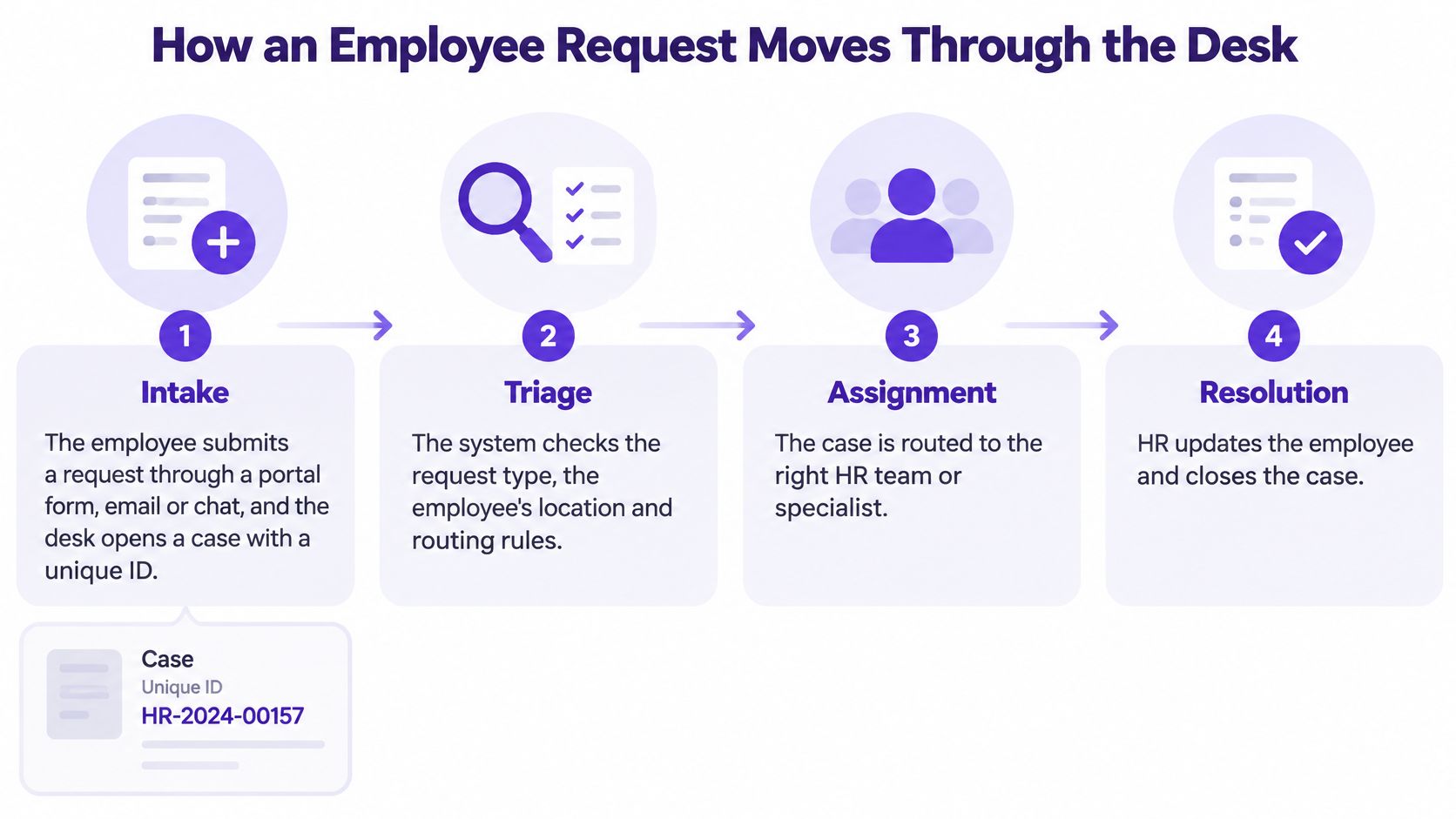
A useful workflow gives every request an owner, a status and a controlled next step. Staff should be able to explain each transition without referring to a complicated automation diagram.
Define the stages before building rules
Intake. An employee submits through a portal form, email or chat, and the desk assigns a unique case ID. Required fields should collect enough context to begin work without requesting unnecessary personal information.
Triage. The system checks request type, employee location and sensitivity. An unclassified request should enter restricted review rather than default to a broadly accessible queue.
Routing. Payroll corrections go to payroll specialists; benefits questions go to benefits staff. Sensitive cases remain limited to named users, including during reassignment.
Approval. A leave request reaches the appropriate manager before HR confirms the balance and completes the transaction. Approval permissions should expose only what the manager needs to decide.
Resolution. The agent supplies an approved answer or completes the action in the HR system. A message saying that work has started isn't a resolution.
Close and learn. The case closes with a reason code and a clear outcome. Repeated questions should prompt an article review rather than another copied response.
The Freshworks 2024 Service Management Benchmark Report, an IT service management study, found that organisations automating business processes with workflows reduced average resolution time by 26.63% and recorded 73.9% first-contact resolution across its benchmark. Those findings support evaluating workflow capability, not promising the same results for an HR team.
Follow a payslip question through the workflow
Say an employee asks why a payslip deduction changed. Intake captures the relevant pay period and opens a case without requiring the employee to attach an entire payroll history.
Triage marks the request as compensation-related and applies the appropriate location rules. If the sensitivity tag is missing, the request could expose payroll details in a general queue. That failure should be caught before assignment.
Routing sends the case to a payroll specialist. Approval isn't necessary for a straightforward explanation, but a correction may require an authorised reviewer before anyone changes payroll records.
The specialist checks the source payroll record, explains the deduction and documents any approved correction. Closure distinguishes an explanation from an actual payroll adjustment, so reporting doesn't treat them as identical work.
Before launch, staff should run proposed rules against sanitised past tickets, including ambiguous requests. Automating an unclear process only repeats the wrong handoff more consistently.
Setting Response Targets by Case Severity
A payroll run failing on pay day and a question about the travel policy cannot share the same response clock. Sort cases by business impact first, then attach a target to each band.
Severity bands and first-response targets for HR cases
| Severity band | Example HR case | First-response target | Metric to track |
|---|---|---|---|
| Critical | Payroll run fails on pay day or all employees lose HR portal access | Within 1 hour | Share of critical cases answered within target |
| High | Benefits access failure during open enrollment | Within 2 hours | Share of high cases answered within target |
| Medium | Leave balance or attendance correction for a team | Within 4 hours | Share of medium cases answered within target |
| Low | Travel or expense policy guidance | Within 8 hours | Share of low cases answered within target |
Treat the 1-, 2-, 4- and 8-hour bands as starting points, not fixed standards. A two-person HR team covering three time zones will land on different numbers than a shared-services desk, so calibrate each band against your own case volumes and staffing before publishing targets to employees.
First response and resolution need separate targets. A useful first response confirms ownership and the next action. An automated receipt alone doesn't establish that anyone has reviewed a payroll failure.
Build targets from the team's workload
- Establish the baseline: Pull recent case volumes, separated by request type and business impact.
- Examine the spread: Calculate median resolution time and the slow end of the distribution. Identify requests delayed by approvals or outside suppliers.
- Define coverage: Document support hours, holidays, time zones and the route for urgent cases outside normal coverage.
- Set achievable commitments: Start near demonstrated capacity for routine work, but give high-impact cases a faster escalation path and a named backup.
A single average can hide a serious failure. Fast policy replies may make overall performance look acceptable while urgent compensation cases wait. When a case holds salary or health details, a slow reply also means sensitive data sits unresolved in the queue longer.
Broader customer support statistics can inform purchasing questions, but they shouldn't determine HR commitments. Company size, geography, staffing and case complexity change what a response-time comparison means.
Escalation check: If a critical case passes its target without an alert reaching a responsible person, the escalation configuration has failed.
Report SLA achievement by priority alongside first-response time, resolution time and open backlog. Managers need to see the exceptions that require action, not just a favourable headline average.
Protecting Sensitive Employee Cases
An HR desk should work like a shared filing cabinet with locked drawers. Payroll specialists hold keys to compensation files. Employee relations specialists hold keys to investigations. The person maintaining the cabinet doesn't automatically receive every key.
That distinction matters because cases may contain health details, grievances, compensation records and investigation notes. Atlassian's HR help desk guidance identifies permissions, encryption and audit trails as core considerations for employee support.
Separate access at each layer
Permissions should cover intake, routing, case notes, attachments and reporting independently. A payroll specialist may need compensation records without access to employee relations investigations. An administrator should be able to configure workflows without automatically reading case content.
Reports need the same attention. A restricted case can still leak information through dashboard labels, search previews, notification emails or exported spreadsheets.
- Encryption: Confirm protection at rest and in transit, including attachments and backups.
- Retention and deletion: Set rules by record category and establish how legal holds interrupt deletion.
- Regional hosting: Document where records, backups and support access are processed.
- Identity controls: Require single sign-on and multifactor authentication for privileged access.
- Audit export: Obtain usable records of reads, edits, exports, reassignments and disclosures.
Least-privilege administration also appears in the government service specification, aligned with information-security management principles. A certification badge isn't a substitute for checking how those restrictions work inside the purchased plan.
Test what an unauthorised person can see
Each audit entry should identify user, timestamp, object and action. An activity feed showing only agent replies won't reconstruct who opened or exported a confidential attachment.
The demonstration should include both a failed access attempt and a successful audit export. First, an unassigned manager attempts to open an investigation through search, a direct case address and a notification. Access should remain blocked.
Then the vendor exports the full access history for that case. If either demonstration requires a more expensive plan, that plan belongs in the cost comparison. Confidentiality isn't an optional upgrade for a system holding sensitive HR records.
Whether AI Self-Service Fits a Small HR Team
Only 8% of SMB organisations reported using AI features embedded in HR technology, compared with 32% of enterprises, in the 2024 to 2025 Sapient Insights HR Systems Survey. Availability doesn't establish that a small HR team can operate AI self-service safely.
This practical reading, which is not a survey finding, points to a staffing reality: fewer administrators, limited maintained content and no service-delivery staff can make setup and supervision harder. A chatbot doesn't remove that workload. It moves it into answer review, content upkeep and failure handling, all of which land on the same people already answering cases.
Separate retrieval from decisions
Policy retrieval is the sensible starting point. The assistant should find approved text, cite it and recognise when the employee's circumstances fall outside it.
Routine transactions, such as retrieving an authenticated employee's leave balance, can also fit. The system must enforce identity checks and record any action.
Recommendations about people belong in a different risk category. An assistant that suggests how to handle an accommodation or grievance isn't merely searching a handbook. Those outputs touch the same sensitive records the rest of the desk is configured to restrict, so they need the same scrutiny a manager's case access would get.
IAPP's analysis of the EU AI Act explains high-risk treatment for relevant employment uses and the prohibition on workplace emotion recognition, subject to the Act's exceptions. Assess the actual use case. Never assume every HR chatbot carries the same legal classification.
Apply a red-flag test
- Grounding: Does each substantive policy answer cite an approved source?
- Human access: Can employees reach an HR person without restarting the conversation?
- Training use: Does the vendor use employee conversations for model training by default?
- Record controls: Can administrators delete an individual conversation, subject to retention obligations?
The AI customer service statistics help frame commercial questions on adoption and cost, but HR acceptance needs stricter scenario checks than a customer-facing deployment.
Start with a small pilot. Use a fixed set of routine policy questions, with approved answers prepared beforehand. Measure correctness, source accuracy and appropriate escalation. Expand only when a named HR owner can maintain the content and review failures.
Choose Your HR Help Desk Software Step by Step
Selection should end with evidence that the product fits the team's workload, not a persuasive demonstration using the vendor's cleanest example.
Turn requirements into purchase conditions
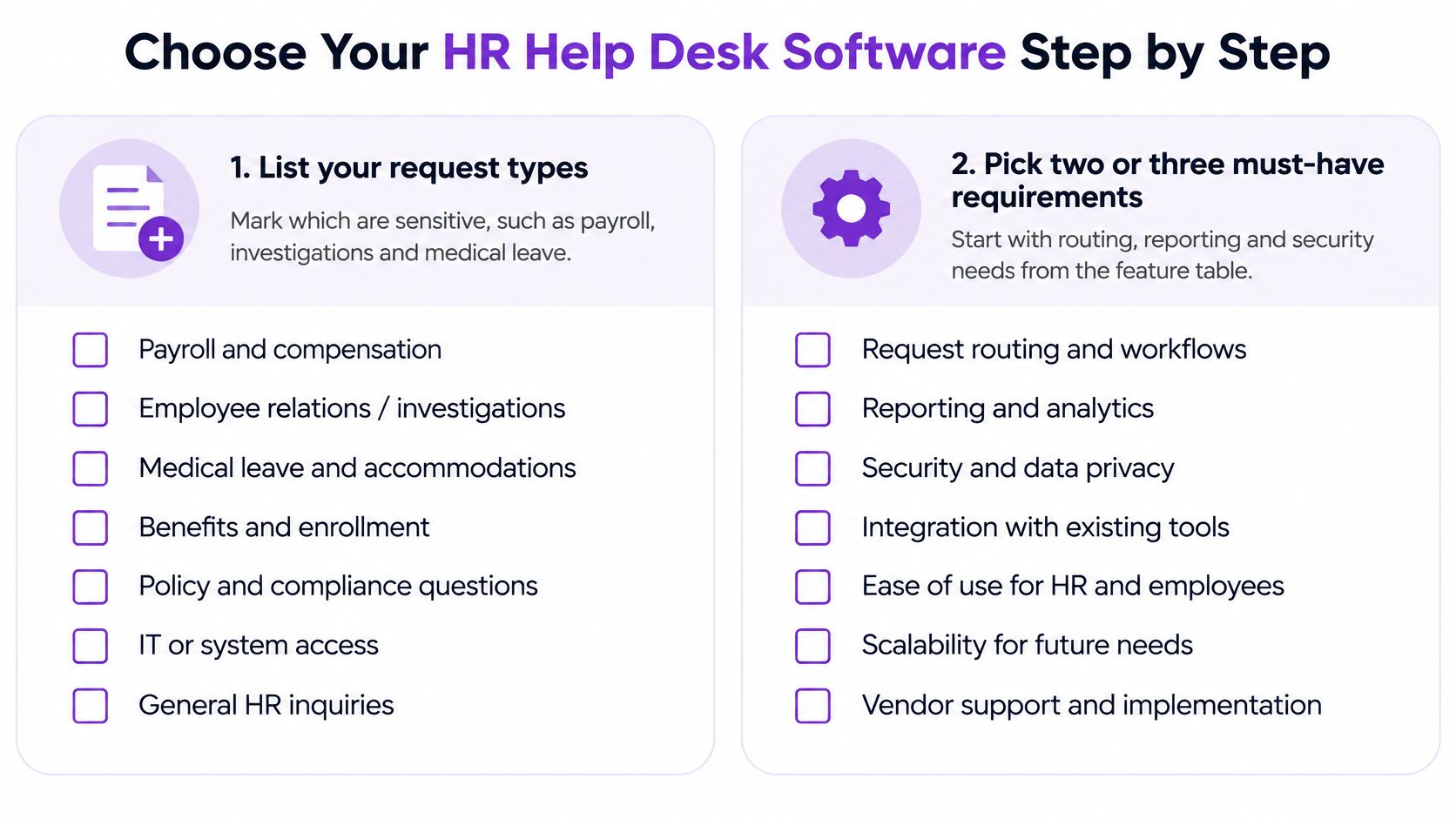
Map request types. Mark payroll, investigations and medical leave as sensitive. Record the owner, approver and system of record for each category.
Select must-have requirements. Begin with routing and case-level access. Add only requirements that address an actual operational problem.
Build a short shortlist. Retain products whose documentation supports those requirements. Marketing language isn't sufficient evidence of restricted case handling.
Calculate the actual bill. For agent-based plans, multiply the monthly agent price by staff answering tickets, not employees receiving support. Add implementation, automation, workflow, integration and required security charges; assess employee-based or usage-based plans using their actual billing units.
Run a controlled trial. Use sanitised examples drawn from recent requests. Test routing, an approval flow and a sensitive case, including absence cover and failed integration handling.
Confirm the exit path. Export cases, attachments and audit logs. Check that relationships, timestamps and readable file formats survive the export.
KeenVerdict's 10 Best Help Desk Software of 2026 ranking scores 10 products, covering general help desks, ecommerce tools and an IT service desk. Most listed prices are per agent per month. That makes the ranking a starting point for cost comparison, not automatic approval for HR records.
Confirm prices and plan limits on each vendor's pricing page on the purchase date, and retain that date with the quote.
The decision rule is simple: choose the lowest-total-cost tool that correctly restricts sensitive cases, supports the required workflows and preserves an exportable access history.
The HR lead should prepare a sanitised request pack and a written acceptance checklist before booking demonstrations. Each shortlisted vendor should complete the same scenarios and provide a dated quote for the required plan. Purchase only after the access, workflow and export checks pass.
Questions or corrections: editorial@keenverdict.com