Guide · General
Software Backup and Recovery: What Works When It Counts
Learn how software backup and recovery works, set RPO and RTO targets, test restores and choose tools that hold up against ransomware and admin mistakes.
By the KeenVerdict research desk · Updated November 24, 2026 · 13 min read
The most repeated advice in this category is to keep three copies of everything on two kinds of media with one offsite, then watch the nightly job report turn green. That advice isn't wrong. It's just answering a different question from the one that matters when an outage starts.
A green tick proves a copy was written. It doesn't prove anyone can get the business running from that copy inside the window the business can survive, and it doesn't prove the copy sits beyond the reach of the account that just lost the production data. Those two gaps are where backup budgets fail.
Table of Contents
- What Backup and Recovery Software Actually Does
- Setting Recovery Targets Before You Choose Software
- Backup Methods Compared and When Each Fits
- Why Successful Backups Still Fail to Restore
- Protecting Backups From Ransomware and Admin Mistakes
- Features That Separate Backup Products
- Choose and Test Your Recovery Setup This Quarter
What Backup and Recovery Software Actually Does
Backup software is adequate only when it restores inside the recovery time objective, from a copy that production credentials can't reach. Isolation, restore testing and workload coverage get checked before feature lists or price. Everything after that is configuration detail.
Think of a backup as a spare house key kept at a neighbour's place. The key exists, it's somewhere else, and it isn't affected when the front door lock jams. Recovery is a different job: getting back inside, restoring the power, and having the heating and water run again. A key that fits a lock nobody can find, in a house with no electricity, hasn't solved the problem.
Five terms worth separating
Most confusion in software backup and recovery comes from treating three different activities as one. A backup is a copy of data or systems stored apart from the original. A restore copies that data back into production. Recovery means systems and applications run again in a usable state, with the dependencies, logins and permissions people need.
| Term | What it means | Question it answers |
|---|---|---|
| Backup | A copy of data or systems stored apart from the original | Was the data copied? |
| Restore | Copying backup data back into the production environment | Can we get the data back? |
| Recovery | Bringing systems and applications back to a usable state | Can the business run again? |
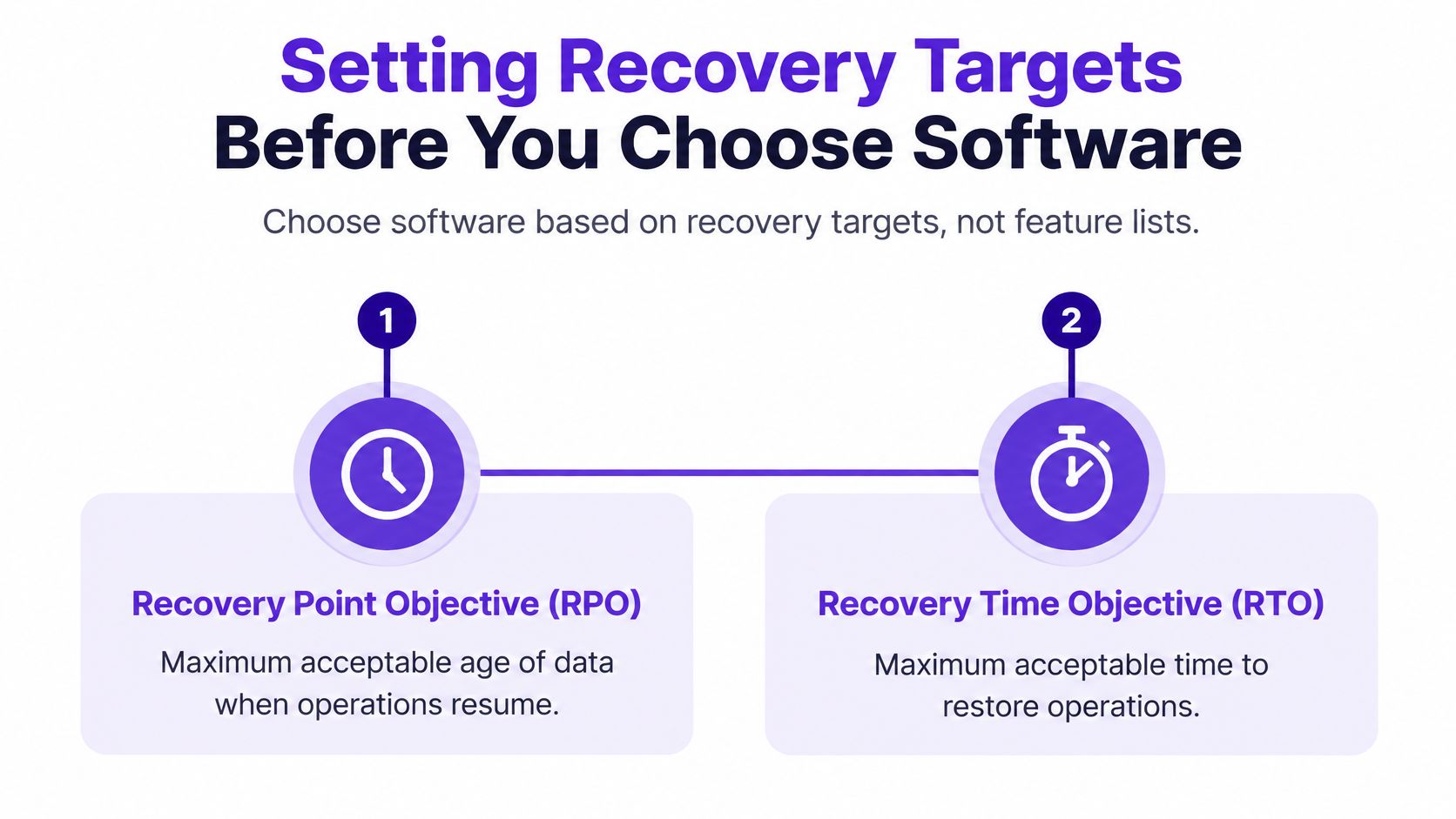
| RPO (recovery point objective) | The maximum acceptable age of data when operations resume | How much data can we lose? |
| RTO (recovery time objective) | The maximum acceptable time to restore systems after an incident | How long can we be down? |
The distinction has commercial weight. Research and Markets valued the global data backup and recovery market at $15.3 billion in 2024 and projects a 12.6% compound annual growth rate through 2034 in its data backup and recovery market outlook report. Buyers are spending on the outcome, not the copy.
Practical rule: a completed backup job is evidence of a copy, and a timed restore is evidence of a recovery. Only one of those gets the business trading again.
The two questions behind every later choice
Every decision in this guide reduces to a pair of questions. How much data can the business afford to lose, and how quickly must it be running again? Answer those per system, in writing, before opening a single vendor pricing page.
Setting Recovery Targets Before You Choose Software
Say a parts distributor runs an order database that takes transactions all day. If the business decides it can lose no more than a quarter of an hour of orders, it needs backups or replication at least every 15 minutes, because NIST's contingency planning guidance ties the recovery point objective directly to copy frequency. If the same business accepts a four-hour RPO, it accepts losing up to four hours of changes and can run far cheaper, less frequent copies.
The recovery time objective works the same way on the other axis. NIST defines RTO as the maximum period a system can remain unavailable before business impact becomes unacceptable, and that number decides the restore architecture: file-level backup can serve a multi-day RTO, while a short RTO pushes toward machine images, replicated databases, automated orchestration or standby infrastructure.
A four-step way to set the numbers
- List every workload that holds business data. Servers, cloud virtual machines, the accounting database, mailboxes, shared file storage, and the line-of-business application nobody has touched in years.
- Estimate what one hour of outage costs. Count lost sales, paid staff time with nothing to do, and customer trust. For scale, ITIC's 2024 Hourly Cost of Downtime research, compiled in BackupDrill's backup and restore failure statistics, found more than 90% of mid-size and large enterprises put one hour of downtime above $300,000, and a related analysis of Global 2000 companies placed aggregate downtime losses near $400 billion a year, about 9% of profits. Those are enterprise figures, so scale them to the revenue of the business in question rather than adopting them.
- Assign an RPO and an RTO to each workload separately. The order database and the marketing file share don't deserve the same targets or the same spend.
- Match each pair to a method and a product that can meet it. Then test the pairing and measure the result, which is what NIST recommends when it asks teams to document recovery actions and problems.
A target is worth paying for only up to the point where the cost of meeting it exceeds the cost of the outage it prevents. Below that line, tighter targets are cheap insurance. Above it, they're a subsidy to a vendor.
| Target | Example | What the software must do |
|---|---|---|
| RPO | 15 minutes | Back up or replicate at least every 15 minutes |
| RPO | 4 hours | Less frequent copies accepted, with up to four hours of changes at risk |
| RTO | Multi-day | File-level backup can meet the target |
| RTO | Under one hour | Machine images, replicated databases, automated orchestration or standby infrastructure |
These are starting points for planning, not standards. Each organization sets its own values against its own tolerance for interruption.
The timeline below puts both targets on one line, so the last good copy, the outage and the moment operations resume can be read together.
Backup Methods Compared and When Each Fits
A photo album explains the three classic methods better than any diagram. A full backup is a complete new album, every photo printed again. An incremental backup adds only the photos taken since the last update of any kind. A differential adds everything taken since the last full album.
The difference shows up on restore day, not backup night. With a weekly full on Sunday and daily incrementals, a Thursday restore needs Sunday's full copy plus four incremental sets applied in order. Restore time grows with the length of the chain, and one damaged link breaks it. Differentials shorten the job to two sets, full plus latest, and pay for that with more storage each night as the week goes on.
Two modern methods with different risks
Snapshots are point-in-time images of a volume. They're quick to create and quick to roll back, and they usually live on the same platform as production, which means the incident that took out the data can take out the snapshot too.
Continuous replication mirrors changes to a second location and can drive the RPO close to zero. It also mirrors a deletion or a corrupted file almost as quickly as a good one. Replication buys availability, not history.
| Method | How it stores data | Restore speed | Main trade-off |
|---|---|---|---|
| Full backup | Copies all data on every run | Fastest, one set needed | Largest storage use and longest backup window |
| Incremental backup | Copies changes since the last backup of any type | Slowest, the whole chain is needed | Smallest backups, but a damaged link breaks the chain |
| Differential backup | Copies changes since the last full backup | Moderate, full plus latest differential | Storage grows each night until the next full |
| Snapshot | Point-in-time image of a volume | Fast | Often stored on the production platform, so not isolated |
| Continuous replication | Mirrors changes to a second location | Fastest for failover | Copies corruption and deletions almost immediately |
Where the second copy lands matters as much as how it's captured. Object storage with a lock on the bucket, a separate cloud account, or an offline drive each change the answer, and KeenVerdict's best cloud storage services comparison covers the offsite options and their retrieval behaviour.
Pick the method for the restore speed the targets demand, then add an isolated copy. Speed alone doesn't protect against deletion or ransomware.
Why Successful Backups Still Fail to Restore
An accounting team deletes a shared folder on Monday morning. Nobody notices until Thursday, when the month-end reconciliation needs a file that isn't there. The backup job has reported success every night in between, and yet nobody can say which restore point holds the folder, who has the rights to pull it back, or how long the restore takes.
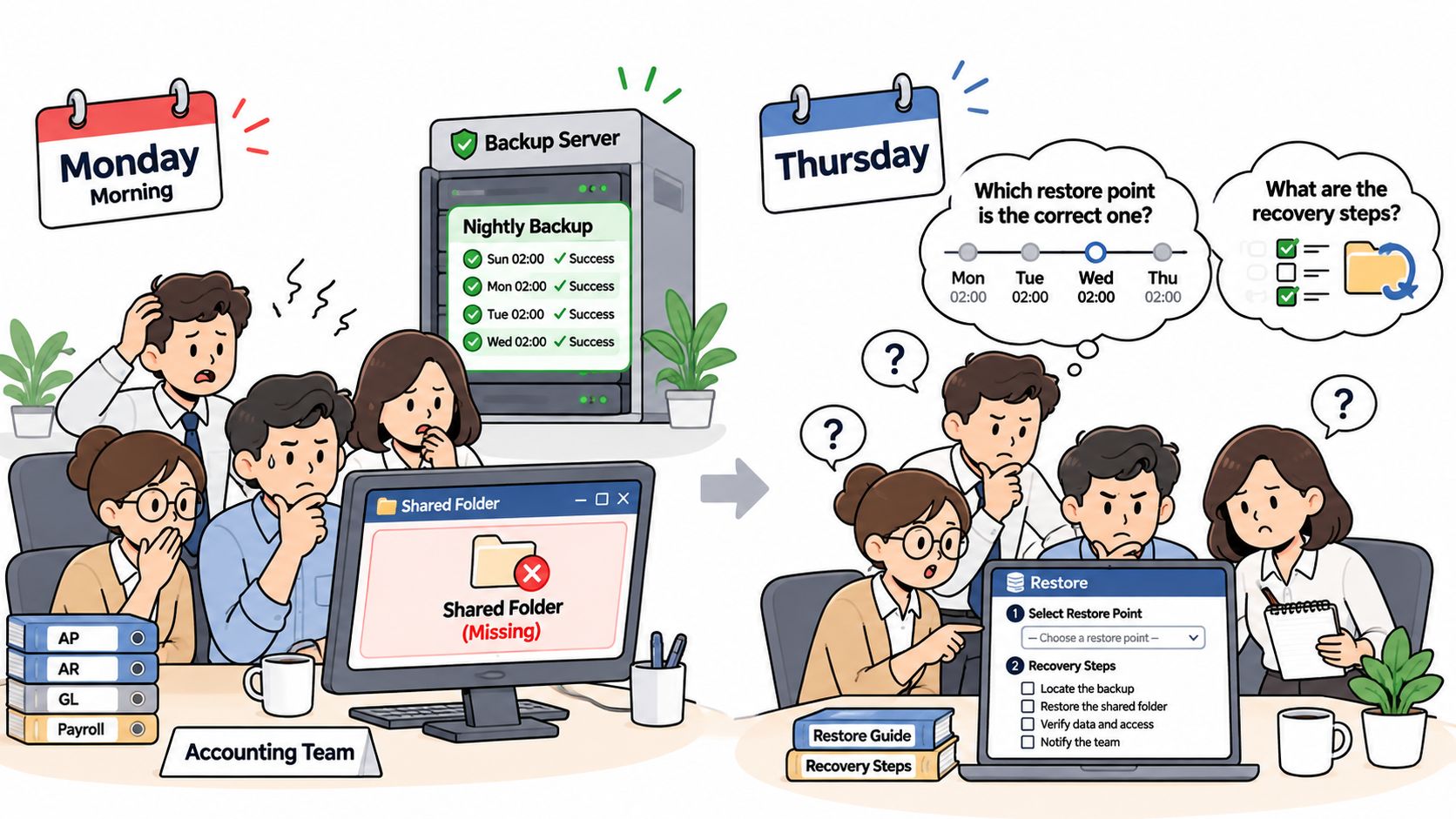
That gap between confidence and capability is measurable. The 2025 State of Backup and Recovery report from Unitrends, which collected responses from 3,051 IT professionals worldwide, found more than 60% of respondents believed their organizations could recover from a downtime event in less than one day, while only 35% reported they could do so.
What actually causes the loss
The same report lists accidental deletion, misconfiguration, server-hardware failure and human error among the leading causes of data loss over the preceding 12 months. Notice what's missing from the top of that list: exotic attacks. Most recovery events start with someone changing something.
Three gaps turn an ordinary mistake into a long outage:
- No restore test. The team has never pulled a full application back into a clean environment, so the first attempt happens during the incident, with the clock running.
- No documented procedure. The one person who knows the restore sequence is on leave, and the runbook lives on the server that failed.
- Retention too short. By Thursday, the version containing the folder has already aged out, and the newest copy faithfully reproduces the deletion.
Application consistency is the hidden failure
A restore can finish cleanly and still leave the business stuck. A database restored without its matching file store, or an application restored without its service accounts and configuration, comes back as parts rather than a working service. The job log says complete. The users say it's broken.
Recovery speed in that survey reflects how uneven this is: just over 40% said their organizations could recover lost data within hours, and 14% said recovery was possible within minutes. Judge a backup product by whether it restores under pressure with the people available that day, not by the colour of its success report.
Protecting Backups From Ransomware and Admin Mistakes
Many ransomware variants go looking for backups reachable from the systems they've compromised, then delete or encrypt them before the main payload runs. That's the mechanism most owners underestimate: the copies get destroyed first, precisely so the restore option disappears.
The CISA StopRansomware guide sets out the controls in a sensible order. Keep offline, encrypted backups of critical data. Use immutable storage, including cloud storage designed to prevent alteration or deletion during a defined retention period. Test both the availability and the integrity of those backups regularly. CISA also flags two caveats worth reading twice: configuration errors can create significant costs, and immutability doesn't automatically satisfy every regulatory retention requirement.
The blast-radius question
If an attacker or a careless administrator controls a production account, can that same identity reach and delete the backups? A separate appliance reachable with the same domain admin credentials isn't isolated, whatever the diagram says.
The exposure is common. A 2025 survey of more than 3,000 IT and security professionals, published in Spanning's State of SaaS Backup and Recovery report, found 25% of organizations had no policies or controls to prevent malicious access to backup infrastructure, and only 40% were confident their solution could adequately protect critical digital assets during a disaster. Separate administrator identities, phishing-resistant MFA, least privilege and dual authorization for deletion shrink that radius. KeenVerdict's best ransomware protection software ranking covers the endpoint and detection side of the same problem.
There's a second mechanic buyers rarely plan for. NIST's cybersecurity event recovery guidance warns that the backups themselves may have been encrypted during the attack, so the newest snapshot isn't automatically the right one. Recovery teams have to establish whether a copy predates the compromise, is unencrypted and complete, and won't reintroduce the attacker.
The recovery order that follows from that guidance:
- Identify the entry point and the compromised accounts.
- Inventory and integrity-check every backup and backup system.
- Select restore points confirmed clean.
- Restore by service priority, taking care not to reinfect clean systems.
- Re-check actual restore time and data loss against the documented targets, and revise the assumptions that missed.
Features That Separate Backup Products
Vendor feature pages look alike. Almost every product claims encryption, cloud support and ransomware protection. The differences appear under pressure, in who can delete a restore point and how long a real restore takes.
| Criterion | What to check | Why it matters |
|---|---|---|
| Immutability and retention lock | Whether copies can be changed or deleted before the retention period ends | Stops ransomware and rogue admins from removing restore points |
| Administrator separation and MFA | Whether backup admin rights are separate from production and protected by MFA | Limits blast radius if a production account is compromised |
| Restore testing and verification | Whether the product can run automated restore tests and integrity checks | Shows whether backups will restore before an incident |
| Granularity | Whether single files, applications and full systems can each be restored | Matches the restore to the size of the loss |
| Restore speed | Measured restore time against the RTO on the organization's own data | Confirms the recovery time target is achievable |
| Coverage | Support for the servers, cloud virtual machines, SaaS mailboxes and file shares in use | Prevents gaps in systems the business relies on |
| Pricing unit | Whether the vendor charges per workload, terabyte, device or user | Determines the real cost once the actual count is applied |
Four product shapes and what each means for isolation
- On-premises backup server software with agents. Veeam-style deployments give deep control over repositories and restore methods, and the buyer owns the hardening of that server and its credentials.
- Purpose-built appliance. A box such as a Rubrik or Cohesity cluster arrives hardened, with the storage and control plane bundled, at the cost of flexibility and a larger single purchase.
- Backup as a service with a provider-hosted vault. The provider runs the vault, so isolation depends on the tenant boundary and on whether the customer's production identity can administer it.
- Cloud-to-cloud SaaS backup. Products such as Spanning or Afi protect Microsoft 365, Google Workspace or Salesforce data into a separate store, which matters because the platform's own snapshot and recycle-bin tools cover infrastructure and short retention windows rather than a mailbox restore months later.
Compare the pricing unit before the price
Per workload, per terabyte, per device and per user produce very different bills for the same environment. A ten-person office with three servers looks cheap under per-device pricing and expensive per user. Write down the count first, apply it to each quote, then record the vendor, the pricing page and the date checked, because prices move. KeenVerdict's Software Buying Statistics section holds 54 sourced figures useful for framing that budget conversation, and its Small Business Cybersecurity Statistics section holds 52 more.
A situational verdict helps more than a universal winner. A small office with one file server and a Microsoft 365 tenant should prioritize SaaS coverage, simple file restore and a vault the production admin can't wipe. A company running a database cluster that must return within an hour should prioritize instant recovery from a local performance tier, application-aware backup and orchestration, and accept the higher cost.
Keep the shortlist to three products. Score each against the criteria table, and drop any product that can't answer the deletion question in writing.
Choose and Test Your Recovery Setup This Quarter
One action beats a long roadmap: a timed restore of a business-critical system, done this quarter.
- Pick the system and its most recent restore point.
- Restore into an isolated environment, never over production.
- Time the restore and compare it with the RTO set earlier.
- Check the age of the recovered data against the RPO.
- Open the restored application and confirm dependencies, logins and access controls work.
- Record each gap with a named owner and a date.
A failed test is a useful result. It prices the gap now, instead of letting an incident price it later. A file-level test alone won't find application-level failures, such as a database that comes back without the files it expects.
Repeat the test each quarter and after any change to infrastructure or backup configuration. For the evaluation itself, KeenVerdict's guide on how to run a software trial sets out a structured way to trial each shortlisted product against the same criteria rather than a vendor's demo script.
Book the restore test this week: pick the system that would stop trading first, restore it into an isolated environment, start a stopwatch, and write the measured time next to the RTO on paper. Then ask each of the three shortlisted vendors one question in writing, whether a compromised production administrator can delete or encrypt the backup copies, and score the answers against the criteria table before signing anything. Targets set, restore proven, and one copy beyond the reach of production credentials.
Cite this page
KeenVerdict. Software Backup and Recovery: What Works When It Counts. Updated November 24, 2026. https://keenverdict.com/software-backup-and-recovery
Questions or corrections: editorial@keenverdict.com